How to Use ChatGPT for Beginners Step by Step: A Complete Guide
How to use ChatGPT for beginners step by step is one of the most useful topics for people who want to explore artificial intelligence and make everyday tasks easier. ChatGPT is an AI-powered assistant developed by OpenAI that can answer questions, generate ideas, write content, explain complicated topics, summarize documents, and assist with many other activities.
Whether you are a student, blogger, business owner, freelancer, or technology enthusiast, learning how to use ChatGPT can improve your productivity and save valuable time.
However, beginners sometimes struggle with writing effective prompts, choosing the right features, and understanding how to get accurate answers. This guide explains everything from creating an account to using advanced features, along with expert recommendations and practical examples.
What Is ChatGPT and How Does It Work?
ChatGPT is an artificial intelligence chatbot designed to understand user instructions and generate conversational responses.
You can communicate with it using everyday language rather than complicated programming commands.
For example, you can ask ChatGPT to:
- Explain a difficult subject in simple language.
- Write professional emails and blog posts.
- Generate business and marketing ideas.
- Create study plans and learning schedules.
- Summarize lengthy documents.
- Help understand programming concepts.
- Translate and improve written content.
ChatGPT uses AI models trained to recognize patterns in language and generate relevant responses. However, it can sometimes produce incorrect or outdated information, so important details should always be verified.
Step-by-Step Guide to Using ChatGPT for the First Time
Follow these simple steps to start using ChatGPT.
Step 1: Visit the Official ChatGPT Website
Open your preferred web browser and visit:
You can access ChatGPT through its official website or download the official mobile application.
Always check that you are using an authentic OpenAI service rather than an unofficial website.
Step 2: Create a ChatGPT Account
If you are a new user, select the sign-up option and follow the registration instructions.
Depending on the available options in your region, you may be able to register using an email address or supported third-party login.
Once registration is complete, sign in to your account.
Step 3: Understand the ChatGPT Interface
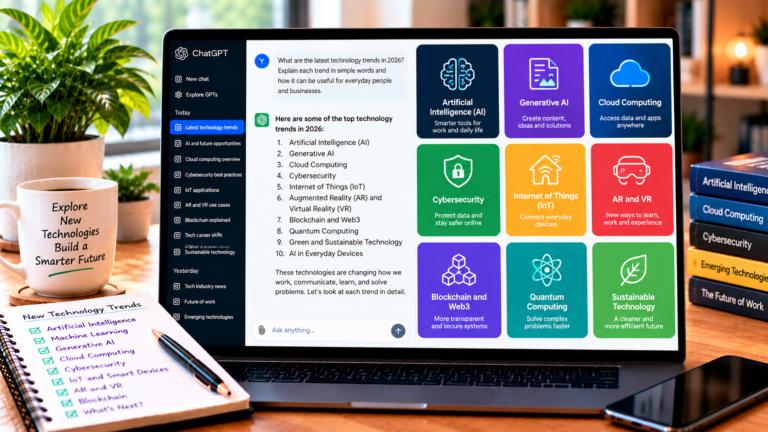
After logging in, you will see the main chat interface.
The important sections include:
- Message box: Enter questions and instructions.
- New chat: Start a separate conversation.
- Chat history: Access previous conversations.
- Settings: Manage available preferences and account options.
- Model selector: Choose from available models or modes when supported by your plan.
Spend a few minutes exploring the interface before starting your first conversation.
Step 4: Write Your First ChatGPT Prompt
A prompt is simply the instruction or question you provide to ChatGPT.
For example, enter:
“Explain artificial intelligence in simple words for a complete beginner.”
ChatGPT will generate an explanation based on your request.
You can also ask follow-up questions to understand the topic more deeply.
Step 5: Improve Your Results With Better Instructions
One of the most important skills for beginners is learning how to write effective prompts.
Instead of asking:
“Write about technology.”
Try:
“Write a 500-word beginner-friendly article explaining how artificial intelligence helps small businesses. Use simple English, clear headings, and practical examples.”
The second prompt provides more context and specific instructions, making it easier to generate useful content.
Best ChatGPT Features Every Beginner Should Explore
ChatGPT offers several useful features that can make everyday activities more convenient.
1. Text Generation
You can use ChatGPT to generate articles, social media captions, product descriptions, emails, and creative ideas.
It is particularly helpful when you need an initial draft or want to organize your thoughts.
2. Voice Mode
Voice conversations allow users to interact with ChatGPT by speaking instead of typing.
This feature can be useful for practicing languages, asking questions, or having hands-free conversations. Availability depends on the application and account.
3. Image Understanding
Where supported, you can upload an image and ask ChatGPT questions about its contents.
For example, students can ask for explanations of diagrams, while professionals can request descriptions of visual information.
4. File Uploads and Analysis
Depending on your plan and available features, ChatGPT can work with supported documents and spreadsheets.
You can request summaries, explanations, and assistance analyzing information.
5. Web Search
When available, ChatGPT can search the web for current information.
This is useful when researching recent technology developments, product recommendations, industry updates, and other time-sensitive subjects.
Best ChatGPT Prompts for Beginners
Learning how to write prompts can significantly improve your experience.
Here are five practical examples you can try.
For learning:
“Explain machine learning in simple language and provide three real-world examples.”
For content writing:
“Create an SEO-friendly blog outline about the benefits of cloud computing.”
For productivity:
“Create a realistic daily schedule for someone who wants to improve time management.”
For business:
“Suggest 10 affordable digital marketing strategies for a small online business.”
For programming:
“Explain HTML and CSS differences with beginner-friendly examples.”
You can also ask ChatGPT to rewrite its responses, provide additional examples, or explain information at a different difficulty level.
Expert Tips for Getting Better Results From ChatGPT
If you want to use ChatGPT effectively, follow these recommendations:
- Be specific: Clearly explain what you want instead of submitting vague instructions.
- Provide context: Mention your audience, purpose, and preferred writing style.
- Set clear requirements: Include word counts, formats, and examples when necessary.
- Ask follow-up questions: Improve responses through additional instructions.
- Verify important information: Check facts, statistics, medical information, and technical recommendations using reliable sources.
- Protect personal information: Avoid sharing passwords, financial details, confidential business documents, or sensitive personal information.
- Review generated content: Edit AI responses to ensure accuracy, originality, and relevance.
These practices help beginners use AI responsibly while improving the quality of their results.
Common ChatGPT Mistakes Beginners Should Avoid
Many new users expect ChatGPT to provide perfect answers immediately. However, using AI effectively requires practice.
Avoid these common mistakes:
- Writing unclear or overly broad prompts.
- Trusting every AI-generated answer without verification.
- Copying generated content without reviewing it.
- Sharing confidential information.
- Ignoring the limitations of AI-generated recommendations.
- Using unnecessary instructions that make prompts confusing.
Remember that ChatGPT is an assistant, not a replacement for professional judgment or independent research.
Is ChatGPT Free for Beginners?
ChatGPT offers a free plan, allowing beginners to explore its core capabilities without immediately purchasing a subscription.
Paid plans may provide additional features, higher usage limits, or access to more advanced models, depending on current availability.
For most beginners, starting with the free plan is a sensible way to understand the platform before deciding whether a paid subscription is necessary.
You can review the latest plans and features on the official website: https://chatgpt.com/
Conclusion
Learning how to use ChatGPT for beginners step by step is an excellent starting point for anyone interested in artificial intelligence. From creating an account and writing prompts to exploring voice mode, file uploads, and web search, ChatGPT offers many practical opportunities for learning and productivity.
Start with simple questions, experiment with different prompts, and gradually explore more advanced features. Most importantly, verify important information and use AI responsibly.
With regular practice and the right techniques, beginners can turn ChatGPT into a valuable assistant for education, business, content creation, and everyday tasks.
About the Author